
Combine conditions and filters
Add one trend filter to your EMA crossover and see which existing signals it allows or blocks.

You already have an event: price crosses above an EMA. Now add one requirement: the closing price must also be above a longer EMA.
Use My EMA practice, BITSTAMP:BTCUSD, and 1-minute candles. Leave all earlier practice alerts paused. This lesson uses chart output; keep Enable signal alerts off.
Add one extra requirement
Section titled “Add one extra requirement”Click Copy on this complete code block.
Replace, save and check the script
Open Pine, click inside My EMA practice, select all, and paste. Use Cmd+A / Cmd+V on Mac or Ctrl+A / Ctrl+V on Windows.
Save with the cloud-shaped control or Cmd+S / Ctrl+S. Apply an update if offered. Add the indicator only if it is missing from the chart.
Pine practice: filters appears on the chart. With the trend filter off, the blue EMA and Cross markers follow the original crossover rule.
Turn on the trend filter
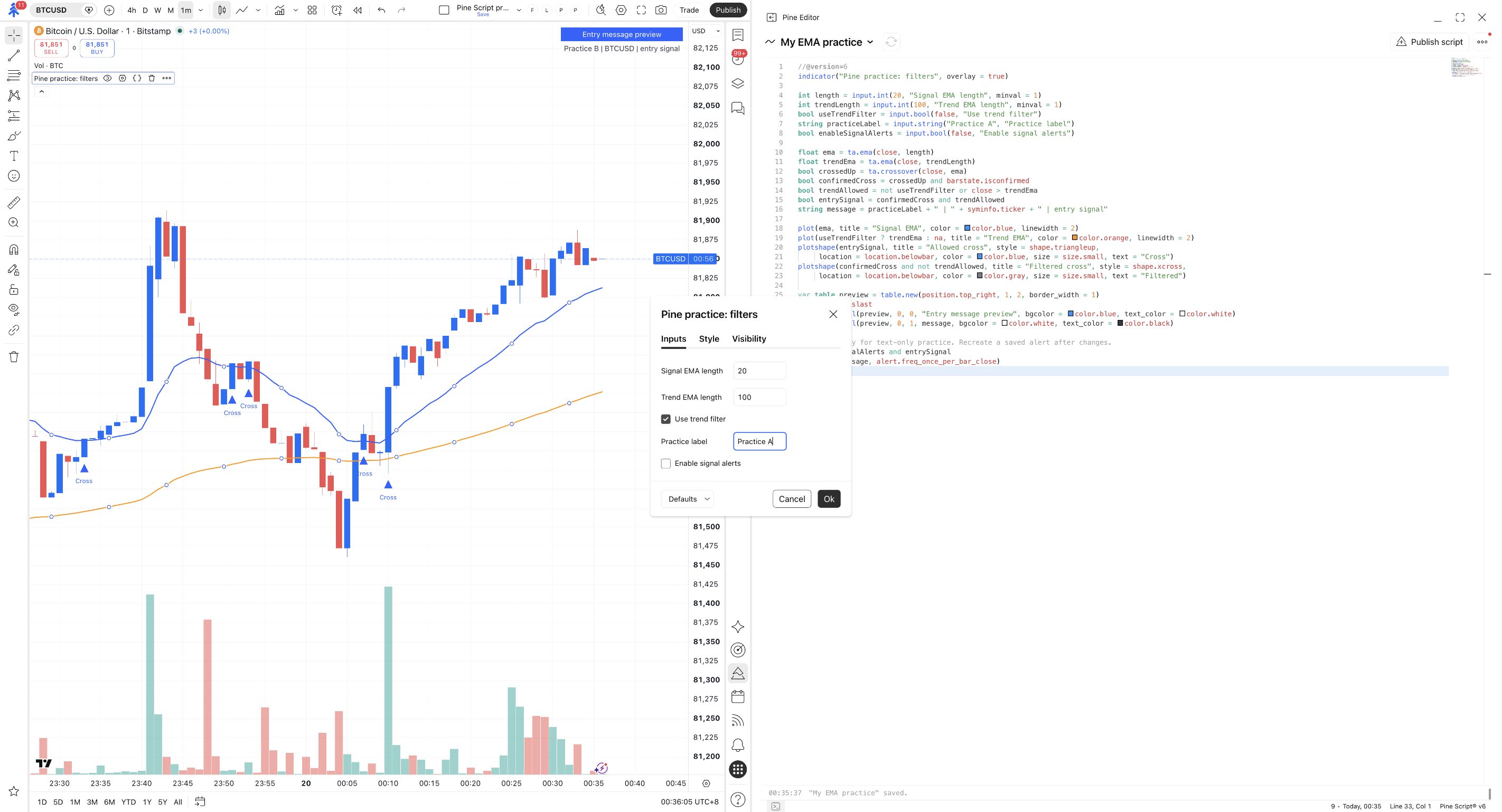
Hover over Pine practice: filters and open its Settings → Inputs. Set Signal EMA length to 20 and Trend EMA length to 100.
Check Use trend filter. Keep Enable signal alerts unchecked, then click Ok.
An orange trend EMA appears alongside the blue signal EMA. Upward crosses below the orange line are marked Filtered.
Find a blocked crossover
Find a Filtered mark. The candle crossed above the blue EMA, but its close was not above the orange EMA.
Now find an allowed blue Cross marker. Its candle passed both requirements. Look farther back if the current view does not contain both examples.
A gray Filtered mark identifies an upward cross that did not pass the extra requirement.
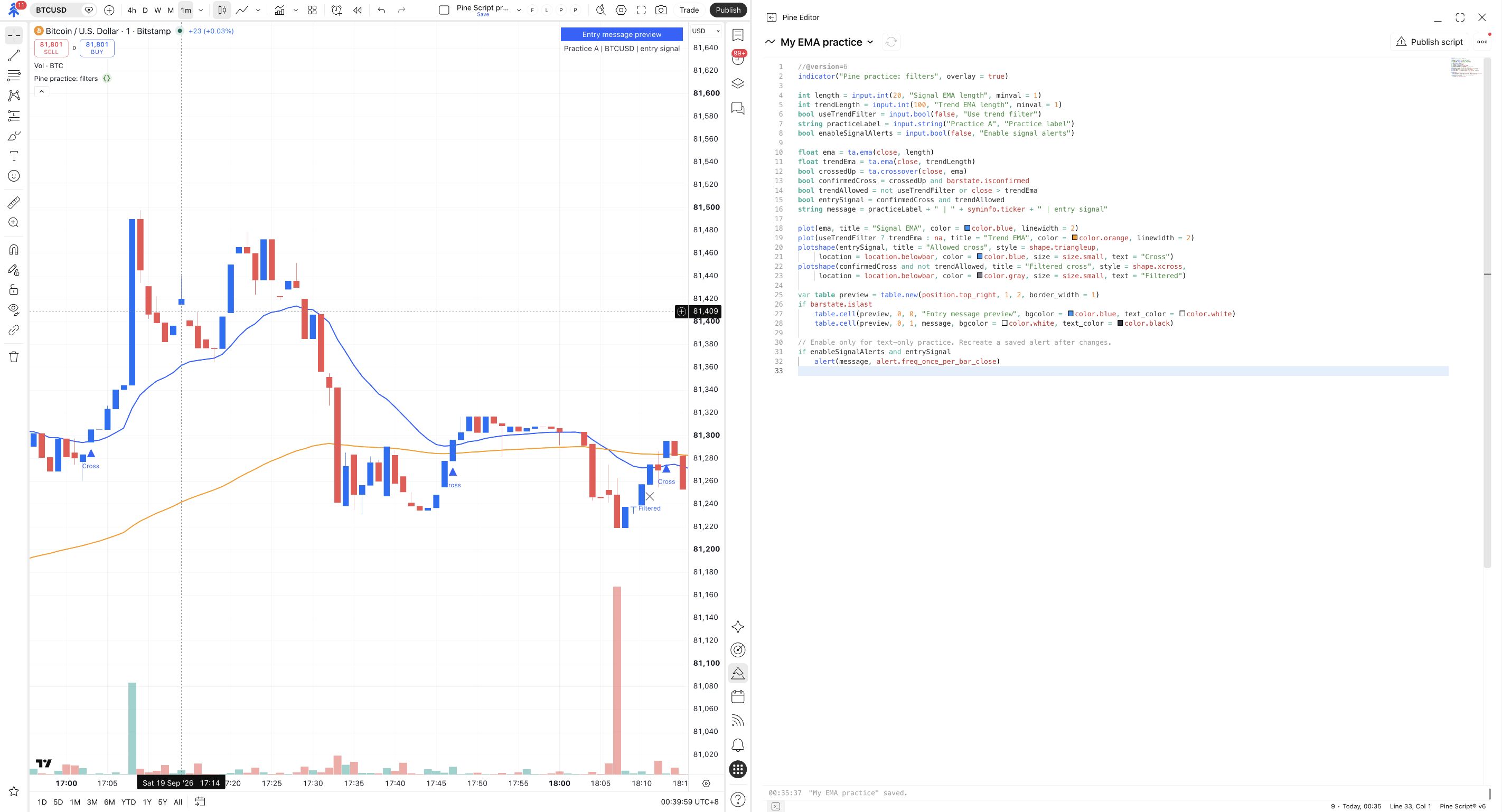
Only blue Cross markers? Check that Use trend filter is on. If it is, the visible crosses may all pass; that does not mean the filter is broken.
Read the combined rule
Section titled “Read the combined rule”The two lines answer two questions:
trendAllowed: is the filter off, or is price above the trend EMA?entrySignal: did a confirmed cross occur, and is the trend filter satisfied?
| Confirmed upward cross? | Trend requirement satisfied? | Final signal |
|---|---|---|
| Yes | Yes | Yes. |
| Yes | No | No. |
| No | Yes | No. Being above the trend EMA alone is not a new crossover. |
The blue and orange EMA calculations remain separate from this decision. Calculate them on each bar, then combine the resulting conditions. Do not move ta.crossover(...) inside the final if block to make it look shorter.
Compare the same candle before and after
Section titled “Compare the same candle before and after”Temporarily turn the filter off
Choose one closed candle marked Filtered. Reopen Inputs, uncheck Use trend filter, and click Ok. Inspect that same candle.
Then turn Use trend filter back on and inspect it again. Keep the EMA lengths unchanged for this comparison.
A previously filtered upward cross becomes an allowed Cross when the additional requirement is removed.
For the same data and lengths, this filter can remove eligible crosses; it does not invent additional crossover events. Fewer signals do not establish a more profitable rule. This exercise checks whether the code implements your stated requirement.
Check yourself
Section titled “Check yourself”Question: price is above the orange trend EMA on six consecutive candles, but does not cross above the blue EMA. How many new entry signals does that fact alone produce?
Show the answer
None. The trend condition is a filter. A confirmed upward cross of the blue EMA is still required.
Try: change Trend EMA length to 200, predict which requirement changed, and inspect the result. Then restore 100 and keep Enable signal alerts off.
What should change?
The orange trend calculation and which crosses pass its filter can change. The blue 20-period EMA and its underlying crossover rule stay the same.