
Turn a condition into a signal
Add crossover markers to your practice chart, then inspect which candles receive a marker and which do not.
Builds on: Your first edit


You will add a Cross marker beneath the candle where price crosses above your EMA. Then you will check why some candles above the line have no marker.
Continue on the BITSTAMP:BTCUSD, 1-minute candlestick chart from lesson 1. You should already see the blue EMA line. If you do not, finish that chart check first. This lesson draws markers; it does not create alerts or place trades.
Add the conditions to your EMA
Section titled “Add the conditions to your EMA”Return to your saved script
In TradingView, click Pine on the right-hand toolbar. Continue in the same saved script, My EMA practice.
Another script is open? Open Pine Editor’s script menu and select your saved My EMA practice before replacing code.
Pine Editor shows My EMA practice and the short EMA script from lesson 1.
Copy the complete version with markers
Section titled “Copy the complete version with markers”Click Copy on the code block below, on this lesson page. This version keeps your EMA and adds the calculations and drawing instructions for the markers. The screenshots show what to look for in TradingView; click them to enlarge them.
Replace the code in My EMA practice
Switch to TradingView and click inside the code. Press Cmd+A, then Cmd+V on Mac. On Windows, press Ctrl+A, then Ctrl+V.
Parts of the old script remain? Select all inside the editor again and paste the complete example. Do not add this underneath the old code.
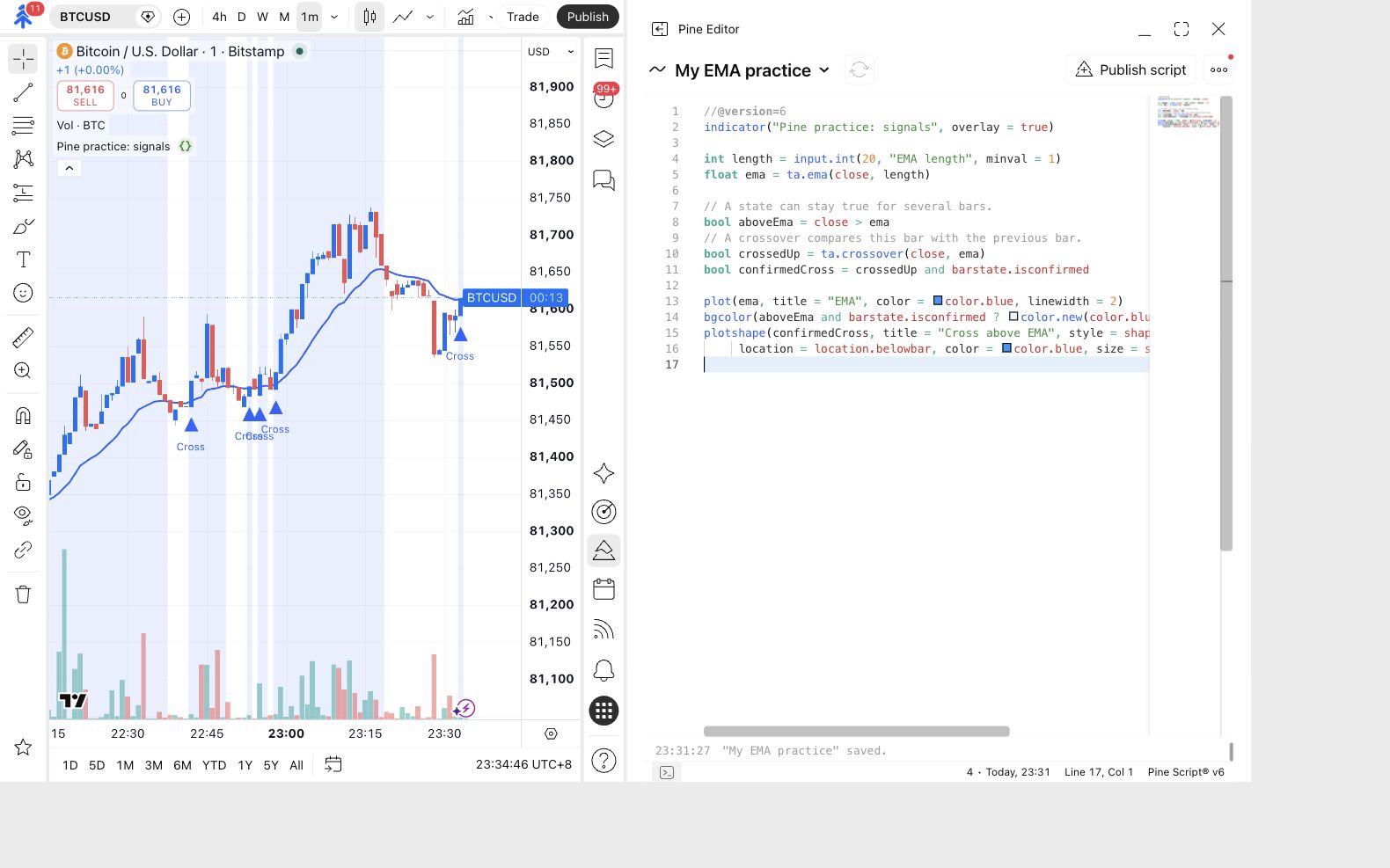
The editor starts with //@version=6 and includes the lines crossedUp and confirmedCross. There is one complete script.
Save and update your chart
Click the cloud-shaped Save control, or press Cmd+S or Ctrl+S. If Update on chart appears, click it. Use the triangle-shaped Add to chart button only if the practice indicator is not already on the chart.
The saved name remains My EMA practice. The chart label changes because this version has a different name inside indicator(…).
The chart label changes to Pine practice: signals. The blue EMA remains, with shaded bars and Cross markers where the conditions match.
Still says Pine practice: EMA? Confirm the new code is saved and the chart instance has updated. Two practice indicators? Remove the older chart entry so only the current practice script is shown.
No recent Cross marker? That is possible. Look back through earlier candles. A marker appears only where the rule matches; adding the script does not make a new crossover happen.
Check the rule on your chart
Section titled “Check the rule on your chart”Find a Cross marker
Look for a blue triangle with Cross beneath it. Compare the marked candle’s closing price with the blue line. Then inspect the candle immediately to its left.
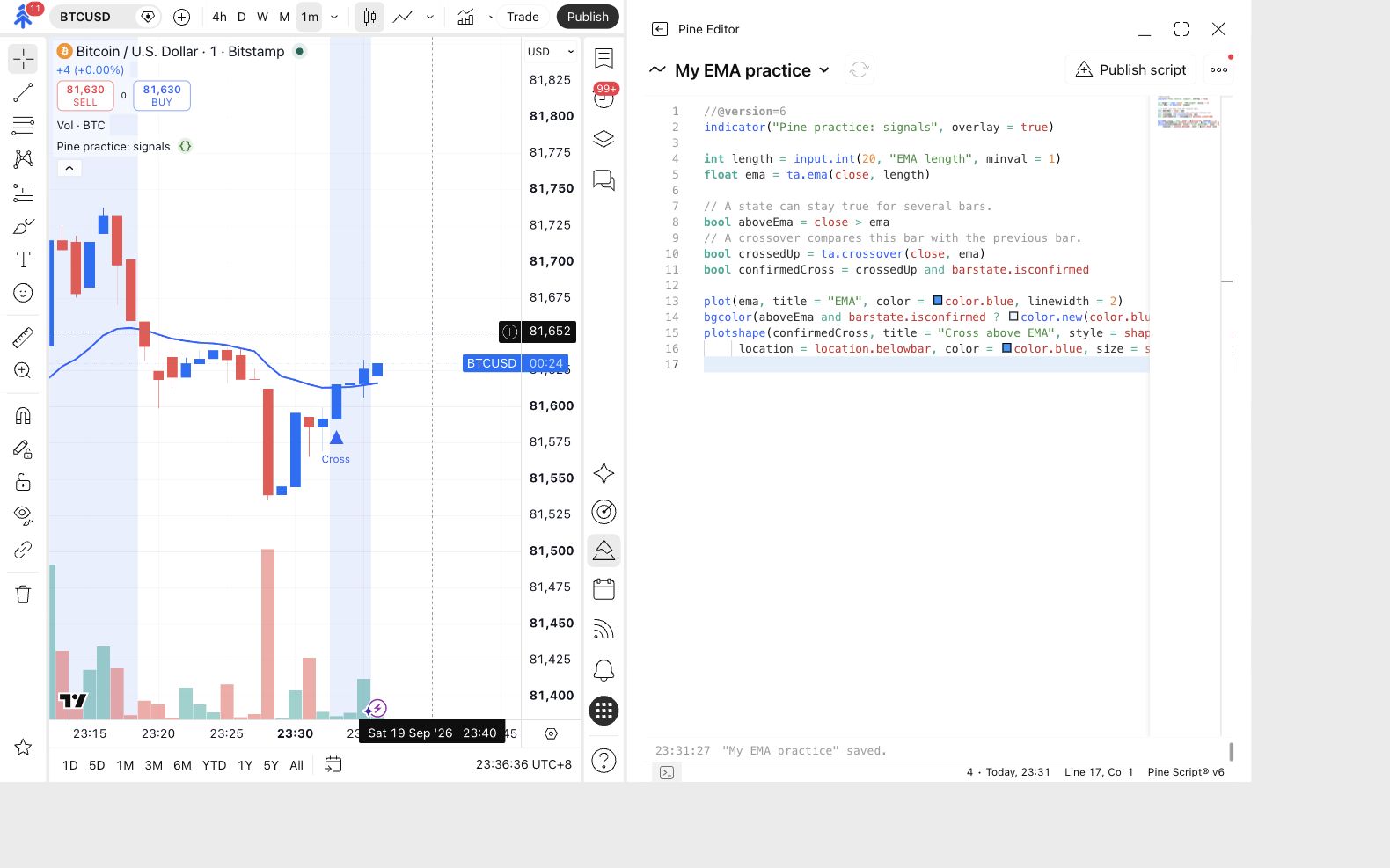
The screenshot highlights both candles so you can see the change in their relationship to the line.
The marked candle closed above its EMA. The previous candle closed at or below its own EMA.
Find a shaded candle without a marker
Look at the candles after a Cross marker. Find a candle with a faint blue background and no new triangle beneath it.
This is an expected result. Shading and markers answer different questions.
The candle is above its EMA, but it has not made a new upward cross from the previous candle.
Compare a condition and an event
Section titled “Compare a condition and an event”You have now seen both cases on a chart:
| What you see | The question being answered |
|---|---|
| Faint blue background | Did this candle close above its EMA? |
| A Cross marker | Did it move from at or below its EMA on the previous candle to above it on this candle? |
Price can stay above an EMA for several candles. Each of those candles can be shaded. They do not all represent a new cross.
Try the comparison: move through the example below. Predict whether the next candle will match the above rule, the crosses above rule, both, or neither.
Move through eight candle closes. Compare both rules against the same fixed line at 100.
98 > 100 is false
98 > 100 and 97 ≤ 100 is false
Close is below 100. Neither rule matches this candle.
Illustration only. We count one sample message at each candle close when its rule is true. The reference stays at 100 to isolate the comparison. No real alerts are created or sent.
Read the complete example
The fixed reference is 100; the close before candle 1 is 97. “Above” means the current close is greater than 100. “Crosses above” also requires the previous close to have been at or below 100.
| Candle | Close | Above 100? | Crosses above? |
|---|---|---|---|
| 1 | 98 | No | No |
| 2 | 101 | Yes | Yes |
| 3 | 103 | Yes | No |
| 4 | 102 | Yes | No |
| 5 | 100 | No | No |
| 6 | 99 | No | No |
| 7 | 101 | Yes | Yes |
| 8 | 102 | Yes | No |
If each rule produced one sample message per matching candle at close, “above” would produce 5 messages, on candles 2, 3, 4, 7 and 8. “Crosses above” would produce 2, on candles 2 and 7. Candle 5 closes exactly at 100, so neither rule matches it. These are illustrative counts, not historical alerts from a running script.
When comparing with a moving EMA, compare the current close with the current EMA and the previous close with the previous EMA. The reference in this exercise is fixed only to make that distinction easier to see.
The illustration uses a fixed line at 100 to make the comparison easier to see. Your working script uses a moving EMA: each candle is compared with that candle’s own EMA value.
Find those rules in the code
Section titled “Find those rules in the code”Return to Pine Editor and find these lines. You do not need to change them.
aboveEmachecks whether the closing price is greater than the EMA.crossedUpcompares this candle with the previous one to detect an upward cross.confirmedCrossalso requires the candle to have closed.
bool means the answer is true or false. and means both requirements must be true. The drawing lines at the bottom turn those answers into the background shading and Cross markers you saw.
Wait for the candle to close
Section titled “Wait for the candle to close”Watch the rightmost candle
Return to the chart and look at the candle on the far right. While it is still forming, its latest price can move above and below the EMA.
A brief move above the line is not enough. For a marker, the crossover condition must still be true when the candle closes.
The current candle can change as prices arrive. This script waits for its close before showing that candle's confirmed marker.
Price went above the line, then closed below it. Is a missing marker an error? No. This version deliberately waits for the close. barstate.isconfirmed is the part of the code that adds that requirement.
Waiting changes the signal’s timing. It does not solve every form of repainting in other scripts. These examples use the current chart’s prices; scripts that use other timeframes need additional checks. More detail: TradingView’s execution model, bar states and repainting.
Try the opposite direction
Section titled “Try the opposite direction”You can keep the upward-cross version for lesson 3. For a short check of your understanding, answer this before editing anything:
Would changing the word Cross in the marker make it detect a downward cross? No. The label describes the result; it does not define the condition. A downward-cross condition would use ta.crossunder(...), and its marker should be labelled to match.