
Define entry and exit signals
Give upward and downward crosses different jobs, with separate chart markers and message previews.
Builds on: Combine conditions


You will give two events different jobs: an upward cross describes a long entry, and a downward cross describes a long exit. An exit from a buy position is not automatically an instruction to open a sell position.
Keep using the same My EMA practice file and 1-minute BITSTAMP:BTCUSD chart. Earlier alerts stay paused. Enable signal alerts stays off, so this lesson only draws and previews messages.
Add an exit condition
Section titled “Add an exit condition”Click Copy on the complete code below.
Replace and save the practice script
Open Pine. Click inside My EMA practice, select all with Cmd+A / Ctrl+A, and paste with Cmd+V / Ctrl+V.
Save with the cloud-shaped control and update the chart if asked. Keep one current practice indicator on the chart.
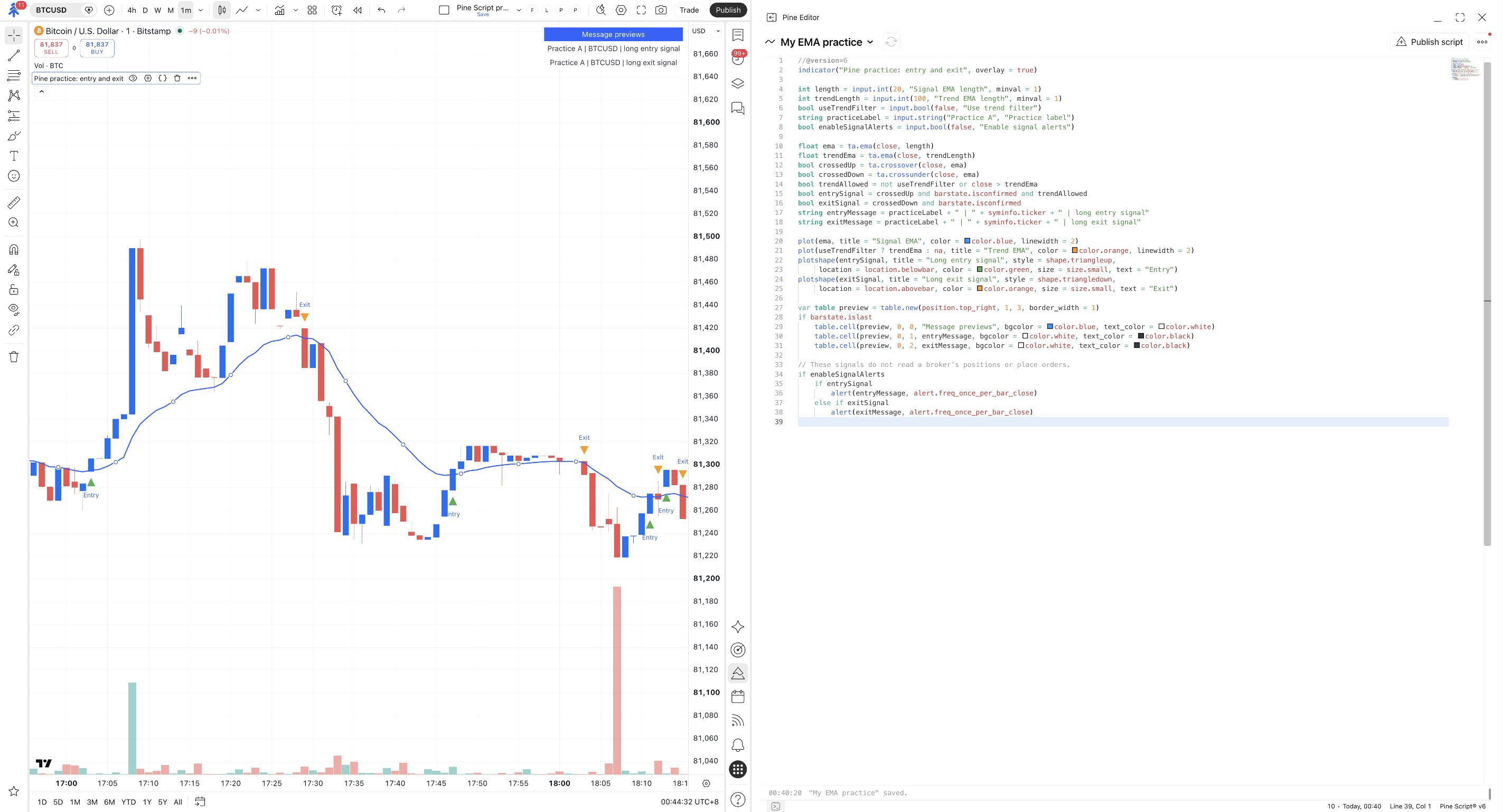
The chart label reads Pine practice: entry and exit. The message preview has separate entry and exit rows.
Start with the unfiltered comparison
Open the settings gear for Pine practice: entry and exit, then Inputs. Set Signal EMA length to 20. Uncheck Use trend filter and Enable signal alerts, then click Ok.
Find a green Entry beneath a candle and an orange Exit above a later candle.
The chart marks confirmed upward crosses as Entry and downward crosses as Exit.
| Marker | What the rule says |
|---|---|
| Entry | Price crossed above the blue EMA on a closed candle. If the trend filter is enabled, it must also pass. |
| Exit | Price crossed below the blue EMA on a closed candle. |
This version concentrates on Entry and Exit markers; it does not show the previous lesson’s gray Filtered labels.
Keep the two jobs separate
Section titled “Keep the two jobs separate”Find these lines in Pine Editor:
ta.crossunder(...) is the downward counterpart to ta.crossover(...). Both final signals require barstate.isconfirmed, so neither represents a brief intrabar move that disappeared before the close.
The preview’s entry row ends long entry signal. The exit row ends long exit signal. They are informational messages, not PineConnector commands. Later, you will map those intentions to the appropriate broker requests.
An Exit marker does not prove a position exists. This indicator cannot see your broker’s positions. It can show an exit condition even when no earlier entry qualified, or when a position has already closed for another reason.
Filter entries without trapping exits
Section titled “Filter entries without trapping exits”Turn the trend filter back on
Open Inputs, set Trend EMA length to 100, and check Use trend filter. Keep Enable signal alerts off and click Ok.
Compare a previously visible exit marker. Its condition still uses the downward cross of the blue EMA; it does not require price to remain above the orange line.
Some Entry markers may disappear, but the downward-cross Exit rule is unchanged.
Putting the entry filter around the entire script would also block exits when that filter is false. Here, each signal has its own condition so you can decide which requirements belong to which action.
At the bottom, if entrySignal and else if exitSignal choose the corresponding message. For this pair of rules, the same closed candle cannot be both above and below the same EMA at once.
Check yourself
Section titled “Check yourself”Question: the trend filter blocks new entries. Does that also prevent a downward-cross exit in this version?
Show the answer
No. exitSignal does not include trendAllowed. Filtering entries does not disable this exit condition.
Question: you see Exit on the chart. Can you conclude that a broker position was closed?
Show the answer
No. It is a chart condition. This lesson has signal alerts off, no webhook, and no broker-position feedback. A broker outcome must be checked separately.
Leave Enable signal alerts off. In the next lesson, add a time window to entries while keeping exits separate.